

In this article
A Home Assistant counter does more than add one to a number. Its configured step determines how far increment and decrement move it, its minimum and maximum limit those movements, and reset returns it to its initial value. Reaching the maximum can also trigger an automation.
These behaviors are related, but they serve different purposes. Home Assistant’s documented front-door, dishwasher-tablet, exercise-target, and chore-reminder examples help show the distinctions.
The counter model
A counter has a current value and several relevant settings:
- Initial value: The value used when the counter is reset.
- Restore: Whether Home Assistant tries to restore the previous value at startup.
- Step: The amount added or subtracted by an increment or decrement action. It defaults to 1.
- Minimum: The lower bound where decrementing stops.
- Maximum: The upper bound where incrementing stops. It can also be monitored by a maximum-reached trigger.
The central distinction is that increment and decrement make stepwise changes, while reset returns directly to the initial value.
Behavior at a glance
| Operation or event | Documented behavior | Uses the step? |
|---|---|---|
counter.increment |
Increases the value and stops at the configured maximum | Yes |
counter.decrement |
Decreases the value and stops at the configured minimum | Yes |
counter.reset |
Returns the counter to its configured initial value | No |
counter.maximum_reached |
Triggers when the counter reaches its configured maximum | Not an action |
Increment does not always mean “add one.” It adds the configured step, which defaults to 1. If the counter has a maximum, it stops there and does not increase further (increment action documentation).
Decrement works in the other direction: it subtracts the configured step and stops at the minimum (decrement action documentation).
Reset is different. It returns the counter to its initial value rather than applying another step (Counter integration documentation).
The documentation establishes these bounded results but does not describe arithmetic edge cases, such as what happens internally when the configured step exceeds the remaining distance to a bound.
Incrementing: front-door openings
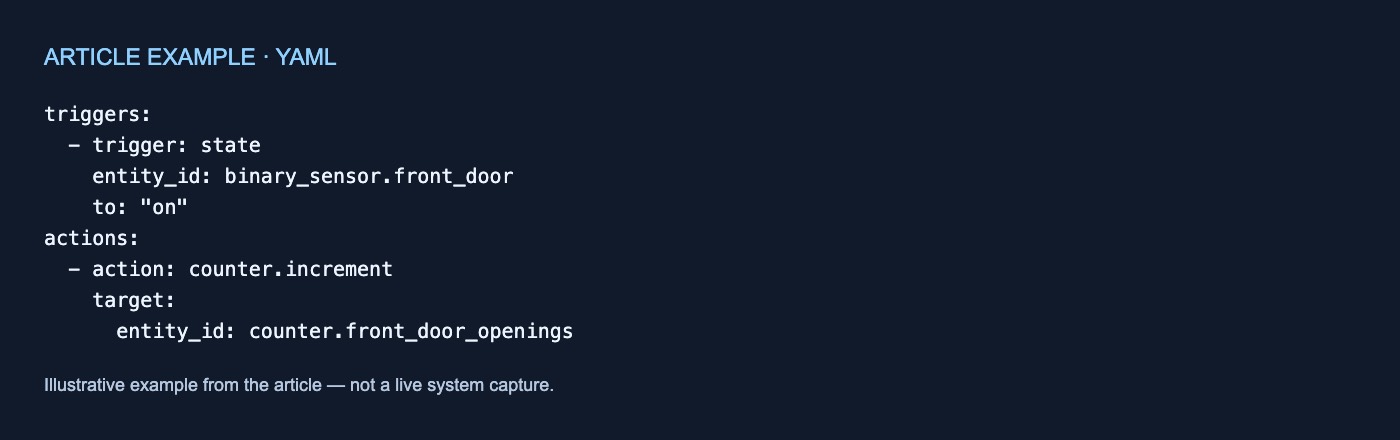
Home Assistant’s front-door example increments a counter when the door’s binary sensor changes to on:
triggers:
  - trigger: state
    entity_id: binary_sensor.front_door
    to: "on"
actions:
  - action: counter.increment
    target:
      entity_id: counter.front_door_openings
Each matching state transition requests one increment action. The counter rises by its configured step, not necessarily by one, and a configured maximum prevents it from going higher than that bound (increment action documentation).
The example illustrates the counter configuration; it does not establish the behavior or reliability of any particular physical door sensor.
Decrementing: dishwasher tablets
The documented supply-stock example decrements a dishwasher-tablet counter when the dishwasher sensor changes to finished:
triggers:
  - trigger: state
    entity_id: sensor.dishwasher
    to: "finished"
actions:
  - action: counter.decrement
    target:
      entity_id: counter.dishwasher_tablets
The action reduces the counter by its configured step. Once it reaches the configured minimum, further decrement actions do not take it lower (decrement action documentation).
This is an example of representing supply use with a counter, not evidence that the resulting value will always match physical inventory.
A bound is not the same as a condition
Home Assistant’s exercise-break example stops requesting increments by placing a condition before the action:
conditions:
  - condition: counter.is_value
    target:
      entity_id: counter.exercise_breaks
    options:
      threshold:
        type: below
        value:
          number: 5
actions:
  - action: counter.increment
    target:
      entity_id: counter.exercise_breaks
The automation calls the increment action only while the counter is below 5. Once the condition is no longer satisfied, that action is not called.
This differs from configuring a maximum:
- A maximum limits how high the counter can go.
- A condition controls whether a particular automation requests an increment.
The published exercise example shows a below-5 condition; it does not show that the counter itself has a configured maximum of 5 (Counter integration documentation).
Reaching maximum: chore reminders
A configured maximum has two documented roles: it bounds incrementing, and reaching it can activate counter.maximum_reached (increment action documentation; maximum-reached trigger documentation).
The chore-reminder example uses that trigger to send a notification and then reset the counter:
triggers:
  - trigger: counter.maximum_reached
    target:
      entity_id: counter.chore_reminders
actions:
  - action: notify.send_message
    target:
      entity_id: notify.my_device
    data:
      message: "The chore reminder counter reached its limit."
  - action: counter.reset
    target:
      entity_id: counter.chore_reminders
The configured sequence is:
- The counter reaches its maximum.
- The maximum-reached trigger activates the automation.
- The automation sends a notification.
counter.resetreturns the counter to its initial value.
Maximum detection and reset are separate operations. In this example, the counter resets because the automation explicitly includes counter.reset (Counter integration documentation).
Maximum-trigger options
When counter.maximum_reached watches multiple counters, Trigger when supports:
- Each: Trigger for each targeted counter; this is the default.
- First: Trigger for only the first targeted counter.
- All: Trigger after all targeted counters reach their maximum.
The trigger fires immediately by default. You can instead require the counter to remain at its maximum for a specified duration. If it falls below the maximum before that duration finishes, the timer resets. An unknown or unavailable counter does not satisfy the trigger until it has a valid value again (maximum-reached trigger documentation).
Reset and startup restoration
Resetting and restarting are not the same operation.
By default, restore is true, so Home Assistant tries to restore the previous counter value when it starts. With restoration enabled, the initial value is used when no previous state is found or when the counter is reset. Setting restore to false disables that startup-restoration behavior (Counter integration documentation).
In short:
- Step controls the size of increments and decrements.
- Minimum and maximum bound those actions.
- Maximum reached detects arrival at the upper bound.
- Reset returns directly to the initial value.
- Restore controls whether startup attempts to resume the previous value.



No comments yet