

In this article
Every Music Assistant player has its own queue. That ownership model is the starting point for Home Assistant automations: identify the player, then either inspect its queue or transfer that queue to another player (Music Assistant usage guide).
Music Assistant documents two separate Home Assistant actions:
music_assistant.get_queueretrieves queue details.music_assistant.transfer_queuetransfers a player’s queue to another player.
The documentation does not say that get_queue must run before transfer_queue, or that the JSON returned by get_queue should be passed to the transfer action. Retrieval and transfer serve different purposes.
This article is based on the cited documentation; no playback or automation testing was performed.
Queue objects, actions, and settings
| Need | Documented object, action, or setting |
|---|---|
| Identify a queue | Start with the player that owns it |
| Retrieve queue details | music_assistant.get_queue |
| Read the current item | Use the action’s response variable in a template |
| Transfer an existing queue | music_assistant.transfer_queue |
| Transfer through the app | Now Playing → ⋮ menu |
| Configure how added content affects queues | Settings → System → Player Queues |
The final row addresses a different concern. Settings → System → Player Queues controls what happens when media such as an album, artist, or playlist is added to a queue (Music Assistant usage guide). Queue inspection and transfer use their respective actions instead.
Retrieve queue details with get_queue
The music_assistant.get_queue action is intended for Home Assistant scripts and automations. It requires the Music Assistant Home Assistant integration and retrieves details about a queue (Music Assistant get_queue documentation).
Music Assistant describes the response as extensive JSON containing information about the current and next queue items. The returned data can be used in Home Assistant templates (Music Assistant get_queue documentation).
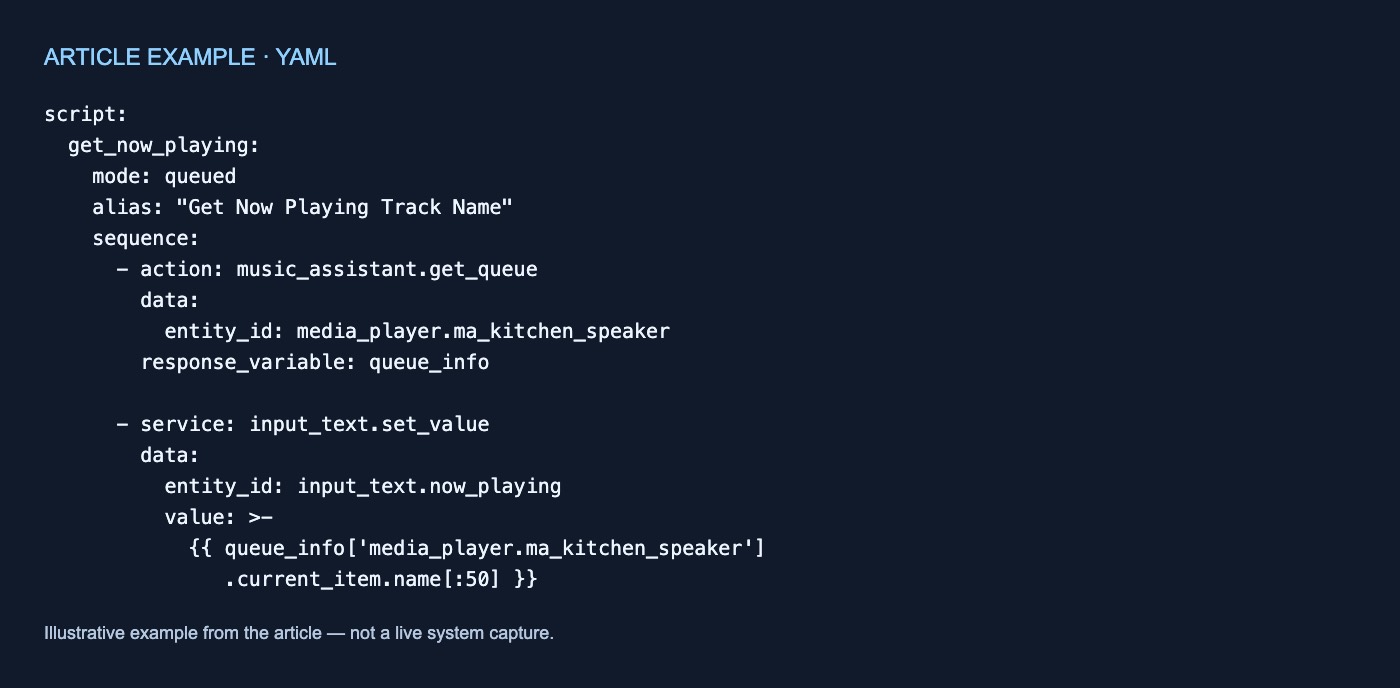
The documented example stores the action response in a variable named queue_info:
script:
  get_now_playing:
    mode: queued
    alias: "Get Now Playing Track Name"
    sequence:
      - action: music_assistant.get_queue
        data:
          entity_id: media_player.ma_kitchen_speaker
        response_variable: queue_info

      - service: input_text.set_value
        data:
          entity_id: input_text.now_playing
          value: >-
            {{ queue_info['media_player.ma_kitchen_speaker']
               .current_item.name[:50] }}
This example connects four parts:
media_player.ma_kitchen_speakeridentifies the player whose queue is requested.response_variable: queue_infonames the action response.queue_info['media_player.ma_kitchen_speaker']selects that player’s result..current_item.namereads the name of the current queue item.
The full template expression shown in the documentation is:
queue_info['media_player.ma_kitchen_speaker'].current_item.name[:50]
The final [:50] slice limits the value to its first 50 characters. It is output handling in the example rather than part of the queue field name. The underlying path shown by the expression is:
queue_info['media_player.ma_kitchen_speaker'].current_item.name
This is one documented path through the response, not a complete schema. Although Music Assistant says the JSON also contains information about the next item, the supplied page does not enumerate every field or describe what current_item contains when the queue is empty or nothing is playing.
That distinction matters when designing templates. The example demonstrates how to read a current item under the conditions it depicts, but it does not document null-state handling or failure behavior.
Transfer a queue with transfer_queue
When the goal is to move an existing queue, use music_assistant.transfer_queue. Music Assistant documents this as a Home Assistant action that transfers a player queue to a different player. It is intended for scripts and automations and requires the Home Assistant integration (Music Assistant transfer_queue documentation).
A queue can also be transferred directly in the Music Assistant app from the three-dot menu in the Now Playing view (Music Assistant transfer_queue documentation).
The supplied action page establishes the capability but does not show the action’s parameters. It therefore does not support naming particular source or destination fields here. Those details need to be taken from the action interface or documentation for the installed integration rather than inferred.
What moves with the queue
Transferring a queue also transfers its shuffle and repeat settings to the destination player (Music Assistant usage guide).
That statement is narrower than a promise to transfer all player or playback state. The documentation identifies the queue, shuffle, and repeat settings, but does not say that other state accompanies them.
Keep inspection and transfer separate
The documented relationship can be summarized as follows:
Player-owned queue
├── get_queue
│   └── Returns queue details for templates
│       ├── Current-item information
│       └── Next-item information
└── transfer_queue
    └── Transfers the queue to another player
        ├── Shuffle setting
        └── Repeat setting
Use get_queue when an automation needs information about a queue—for example, to place the current item’s name in an input_text helper. Use transfer_queue when the intended effect is to move the existing queue to another player.
Nothing in the cited pages requires retrieval before transfer. Nor should the get_queue response be treated as a documented transfer payload: get_queue exposes queue details for templates, while transfer_queue acts on a player queue (get_queue documentation; transfer_queue documentation).
Limits of the current documentation
The cited pages do not establish:
- A complete or stable
get_queueresponse schema. - Empty-queue or missing-current-item behavior.
- Failure responses or retry behavior for either action.
- Transfer timing or atomicity.
- Preservation of playback position or playback state.
- Uninterrupted playback during transfer.
- Handling of an existing destination queue or active playback.
- Queue ownership or transfer behavior for grouped players.
- Transfer of settings other than shuffle and repeat.
- Product versions in which these actions were introduced or changed.
These behaviors should not be inferred from the current-item template or from the existence of the transfer action.
Practical takeaway
For an existing Music Assistant queue:
- Begin with the player that owns it.
- Use
music_assistant.get_queueto retrieve details for a Home Assistant template. - Read the documented current-item name through the action’s response variable.
- Use
music_assistant.transfer_queueseparately to move the queue to another player. - Expect shuffle and repeat settings to move with the queue.
- Treat Player Queues settings as configuration for adding content, not as an inspection or transfer mechanism.


No comments yet