

In this article
A Music Assistant announcement can begin as either audio or text. That input—and where the request originates—determines the documented entry path and which component controls text-to-speech generation.
Music Assistant documents three cases:
play_announcementreceives an audio URL from a Home Assistant script or automation.- A Home Assistant TTS action receives text and targets a Music Assistant media-player entity.
- Music Assistant’s system settings select the TTS engine for announcements initiated within Music Assistant.
These distinctions describe inputs and configuration ownership. They do not prove that the options use entirely separate playback pipelines.
Scope: This is a documentation-based explanation. No playback or volume testing was performed.
The three paths at a glance
| Entry path | Input | Initiator | TTS selection | Documented prerequisite or setting |
|---|---|---|---|---|
Music Assistant play_announcement |
URL pointing to audio | Home Assistant script or automation | Not applicable to the supplied input; it is already audio | Requires the Home Assistant integration (announcement FAQ) |
| Home Assistant TTS action | Text | Home Assistant | Home Assistant TTS service | Target a Music Assistant media-player entity (announcement FAQ) |
| Music Assistant announcement TTS | Text for an announcement initiated within Music Assistant | Music Assistant | Engine selected in Music Assistant | Configure Announcement text to speech engine under system-level Players settings (system settings) |
All three cases involve a Music Assistant player, but they do not begin with the same request.
Path 1: Supply audio through play_announcement
Music Assistant’s play_announcement action sends an audio announcement supplied by URL to a player. It is used from Home Assistant scripts and automations and requires the Home Assistant integration (Music Assistant announcement FAQ).
This path fits material that is already available as audio. The documentation gives three ways to make that audio available:
- An external audio URL, such as the example MP3 linked from the documentation
- A sound file stored in Home Assistant’s
wwwfolder and exposed through a/local/URL - A file served by a self-hosted web server
The automation supplies a URL, not text. The cited documentation does not say that play_announcement selects a TTS engine or converts a message into speech.
These hosting methods are examples rather than compatibility guarantees. The supplied documentation does not define support for particular codecs, authentication methods, servers, or network arrangements.
Path 2: Send text through Home Assistant TTS
For a text message, Music Assistant’s announcement FAQ directs users to call a Home Assistant TTS service and target a Music Assistant media-player entity (Music Assistant announcement FAQ).
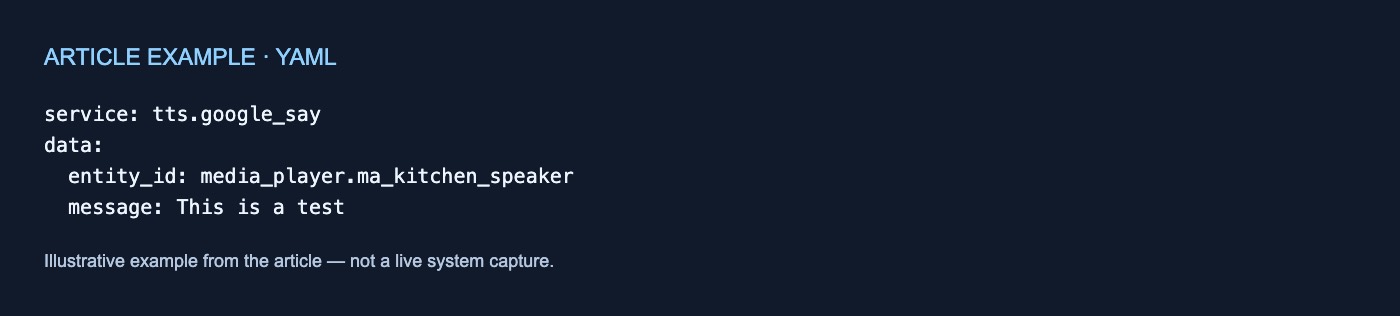
The documented example is:
service: tts.google_say
data:
  entity_id: media_player.ma_kitchen_speaker
  message: This is a test
The fields show the two sides of the request:
messagecontains the text to synthesize.entity_ididentifies the Music Assistant media-player entity that Home Assistant targets.
In this path, the Home Assistant action selects the TTS service. The documented example uses tts.google_say; it does not pass text to Music Assistant’s play_announcement action.
The player also needs to be available as a Home Assistant entity. Music Assistant provides an Expose this player to Home Assistant option in each player’s settings. If that option is disabled, the documentation says the player will not be imported into Home Assistant (Individual Player Settings).
The example demonstrates one documented service call. It does not establish compatibility with every Home Assistant TTS provider or guarantee that the shown syntax remains unchanged across versions.
Path 3: Select Music Assistant’s announcement TTS engine
Music Assistant has a system-level Announcement text to speech engine option under its Players settings. This option selects the engine used to generate announcements sent from within Music Assistant (MA System Settings).
That scope distinguishes it from the Home Assistant TTS path. The setting is documented for announcements initiated within Music Assistant, not as the engine selector for a Home Assistant tts.google_say call.
The available engines come from installed plugins, with the Home Assistant Plugin given as an example (MA System Settings). The documentation does not enumerate every supported engine or guarantee which engines will appear in a particular installation. It also notes that settings may differ slightly between the Home Assistant App and Docker server versions.
The resulting ownership split is straightforward:
- Home Assistant TTS action: Select the TTS service in Home Assistant.
- Music Assistant-originated announcement: Select the engine in Music Assistant’s system settings.
play_announcement: Provide audio through a URL instead of supplying text for synthesis.
Where per-player settings fit
The announcement’s entry path and the destination player’s configuration are separate concerns.
Each player has an Announcements Configuration section with options for controlling announcement volume (Individual Player Settings). These are player-level settings rather than the system-level selector for Music Assistant’s announcement TTS engine.
The documentation states one specific constraint: the maximum and minimum volume fields do not apply when Absolute volume is selected (Individual Player Settings). It does not describe measured results across different devices, protocols, or providers.
The documented boundaries are therefore:
- The caller supplies either audio by URL or text.
- Home Assistant or Music Assistant controls TTS selection, depending on where the text announcement originates.
- Each Music Assistant player has its own announcement-volume configuration.
- Each player’s settings determine whether it is exposed to Home Assistant.
Choosing a path
Choose according to the input and initiator:
- You already have an accessible audio URL: Use
play_announcementfrom a Home Assistant script or automation. - A Home Assistant automation has text: Call a Home Assistant TTS service and target the exposed Music Assistant media-player entity.
- The announcement originates within Music Assistant: Configure Music Assistant’s system-level announcement TTS engine.
- You need player-specific announcement-volume settings: Open that player’s Announcements Configuration section.
This map covers documented inputs, prerequisites, and configuration owners. It does not establish behavior for interruption, resuming playback, caching, URL authentication or reachability, synchronization, latency, or provider compatibility.
No comments yet