

In this article
The retired Local Audio Out provider no longer handles soundcards attached to the Music Assistant host. That responsibility now belongs to the separate, experimental Local Audio app. It runs alongside Music Assistant, plays through the audio hardware of its own host, and appears in Music Assistant as a Sendspin player discovered over mDNS (Local Audio documentation).
This division explains why there is no replacement Local Audio provider to add. The Local Audio app owns the physical output choice, while Music Assistant owns settings for the player it discovers.
Scope: This is a documentation-based architectural explanation. No soundcard, discovery, or playback testing was performed.
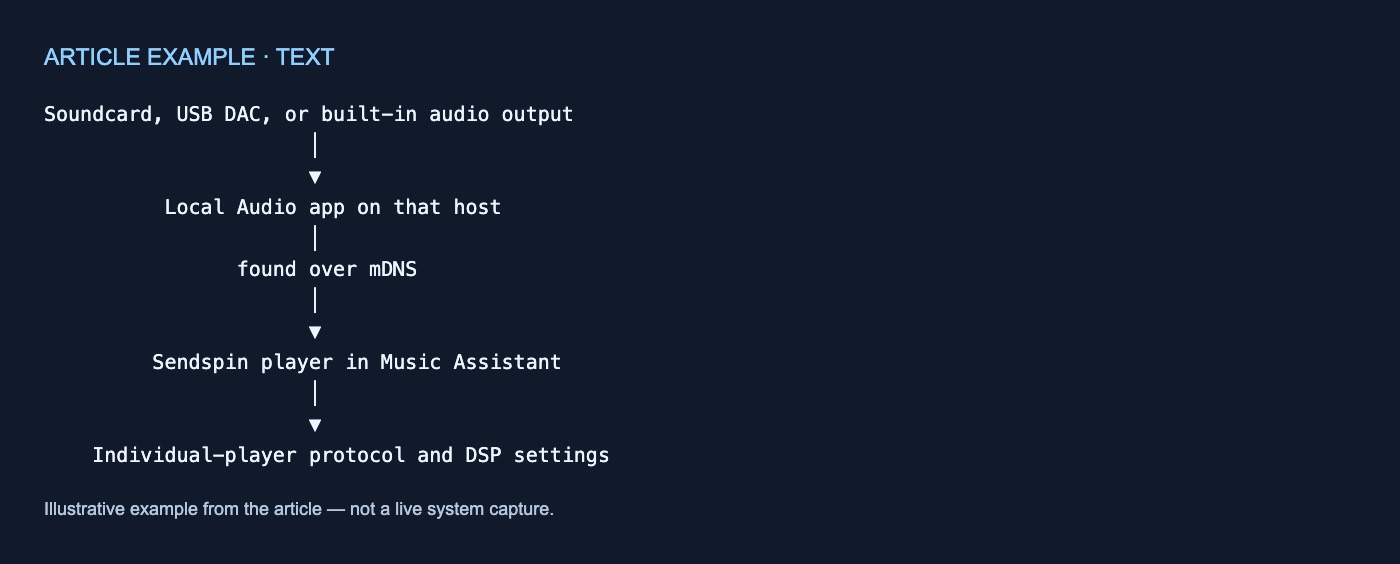
The documented component path
Soundcard, USB DAC, or built-in audio output
                      │
                      ▼
          Local Audio app on that host
                      │
                found over mDNS
                      │
                      ▼
         Sendspin player in Music Assistant
                      │
                      ▼
    Individual-player protocol and DSP settings
The important boundary is between hardware access and player representation. The Local Audio app plays through the hardware of the machine on which it runs. Music Assistant does not manage that hardware through an internal Local Audio provider; instead, the app appears there as a Sendspin player (Local Audio documentation).
What to do with Local Audio Out
The old Local Audio Out provider:
- is retired;
- can no longer be added;
- fails to load if it remains configured; and
- should be removed through its settings.
That is the complete documented guidance for an existing Local Audio Out configuration (Local Audio documentation). The page does not describe an automatic migration process or promise that earlier settings will transfer to the separate app.
As a result, an existing Local Audio Out configuration can fail to load while no new Local Audio provider is available to add. This is consistent with the new component boundary: local hardware playback now sits outside Music Assistant’s provider list.
The Local Audio app owns output selection
The Local Audio app handles soundcards, USB DACs, and built-in outputs available on its host. It runs alongside Music Assistant rather than inside it (Local Audio documentation).
On Home Assistant, install Local Audio from the Music Assistant app repository. Select the physical output in the Local Audio app’s own Audio panel; the documentation explicitly says that nothing in the app’s configuration selects an output (Local Audio documentation).
The ownership path is therefore:
- The host makes its audio outputs available.
- The Local Audio app’s Audio panel selects an output.
- The app becomes discoverable over mDNS.
- Music Assistant represents it as a Sendspin player.
- Music Assistant exposes settings for that player.
Selecting hardware and configuring the discovered player are separate tasks. The app chooses the host output, while Music Assistant manages the player-facing settings.
Outside Home Assistant, the documented form is a container run with Docker Compose (Local Audio documentation). The supplied documentation excerpt does not contain enough configuration detail to specify device mappings, permissions, volumes, environment-variable values, or an installation procedure.
Why there is no Local Audio provider to add
A conventional Music Assistant player provider knows how to communicate with a family of devices rather than representing one speaker. For example, one AirPlay provider covers AirPlay devices, while one Sonos provider covers Sonos devices (Player Providers).
Local Audio follows a different path:
- The separate app accesses the host’s audio hardware.
- The app is found over mDNS.
- Music Assistant receives it as a Sendspin player.
- There is no Local Audio provider to add.
The usual Settings → Player Providers → Add a player provider workflow applies to conventional device-family providers (Player Providers). It does not apply to Local Audio because its documentation explicitly says there is no provider to add (Local Audio documentation).
Put simply, a provider communicates with a category of devices, while a player is the playback target represented in Music Assistant. The Local Audio app supplies the latter through Sendspin.
What Music Assistant owns after discovery
Music Assistant displays a player’s available protocols as chips at the top of its individual-player page and under Output Protocols (Individual Player Settings). The documentation does not specify the complete protocol set that every Local Audio instance will expose.
Sendspin does not stream over HTTP. As a result, Sendspin players show only Output Channel Mode from the documentation’s list of shared protocol settings (Individual Player Settings). “Only” applies to that shared list, not necessarily to every setting or control available for the player.
DSP also belongs to the individual-player settings surface. Music Assistant documents DSP filters as independently configurable for each player (Individual Player Settings). That does not move physical output selection into Music Assistant: the Local Audio app still owns that choice.
Configuration ownership at a glance
| Component or stage | Documented role | Configuration surface |
|---|---|---|
| Local Audio Out provider | Retired; existing configurations fail to load | Remove it from its settings |
| Host audio hardware | Supplies the physical audio output | Host and Local Audio app |
| Local Audio app | Plays through hardware on its machine | App interface |
| Home Assistant output selection | Chooses the app’s physical output | Local Audio app’s Audio panel |
| Non-Home-Assistant deployment | Runs Local Audio as a container | Docker Compose |
| mDNS | Supplies the documented discovery path | Network discovery |
| Sendspin player | Represents the app in Music Assistant | Individual-player page |
| Output Protocols | Shows available player protocols | Individual-player settings |
| DSP | Applies independently configured filters | Individual-player DSP settings |
These boundaries are documented across the Local Audio, Player Providers, and Individual Player Settings pages.
What the documentation does not establish
The Local Audio app is marked experimental and has not been widely tested on real hardware (Local Audio documentation). The supplied evidence does not establish:
- compatibility with a particular soundcard, DAC, driver, or ALSA device;
- mDNS discovery timing or required network conditions;
- playback quality, latency, or reliability;
- the exact controls exposed by a given Local Audio instance;
- container settings beyond the documented Docker Compose form; or
- a migration path beyond removing the retired provider and separately using the app.
The documented conclusion is architectural: the Local Audio app owns host audio output, mDNS provides its discovery path, and Music Assistant represents it as a Sendspin player with individual protocol and DSP settings.
No comments yet