

In this article
Suppose a customer requests an appointment through your website. An AI agent then calls to confirm the request, collect a missing detail, or arrange a time.
For a Des Moines or Kansas City service-business operator, the decision is not simply which voice model sounds best. It is whether the proposed system covers the full follow-up workflow: triggering the requested call, supplying relevant context, handling voicemail, recording the result, and escalating to an employee when needed.
The familiar voice loop—listen, transcribe, generate a response, and speak—is only one part of that system. This is a documentation-based architecture explanation; no hands-on deployment or independent performance testing was performed.
The shared inbound voice loop
Twilio’s inbound ConversationRelay example begins when a customer calls a Twilio number. An incoming-call webhook connects the call to an application over WebSocket. ConversationRelay transcribes the caller’s speech, sends the text to a language model, converts the response to speech, and streams the audio back to the caller. (Twilio inbound example)
Customer calls
      ↓
Incoming-call webhook
      ↓
Speech converted to text
      ↓
Language model generates a response
      ↓
Response converted to speech
      ↓
Audio returned to customer
That is the conversational core shared with an outbound agent. It does not, by itself, decide whom to call, provide the reason for calling, distinguish a person from voicemail, or return the result to a business system.
The additional outbound architecture
Twilio and Deepgram’s outbound reference implementation adds call origination, customer-context injection, human-or-voicemail detection, and a structured outcome returned to a system of record. (Twilio outbound example)
For a hypothetical appointment follow-up, the complete path looks like this:
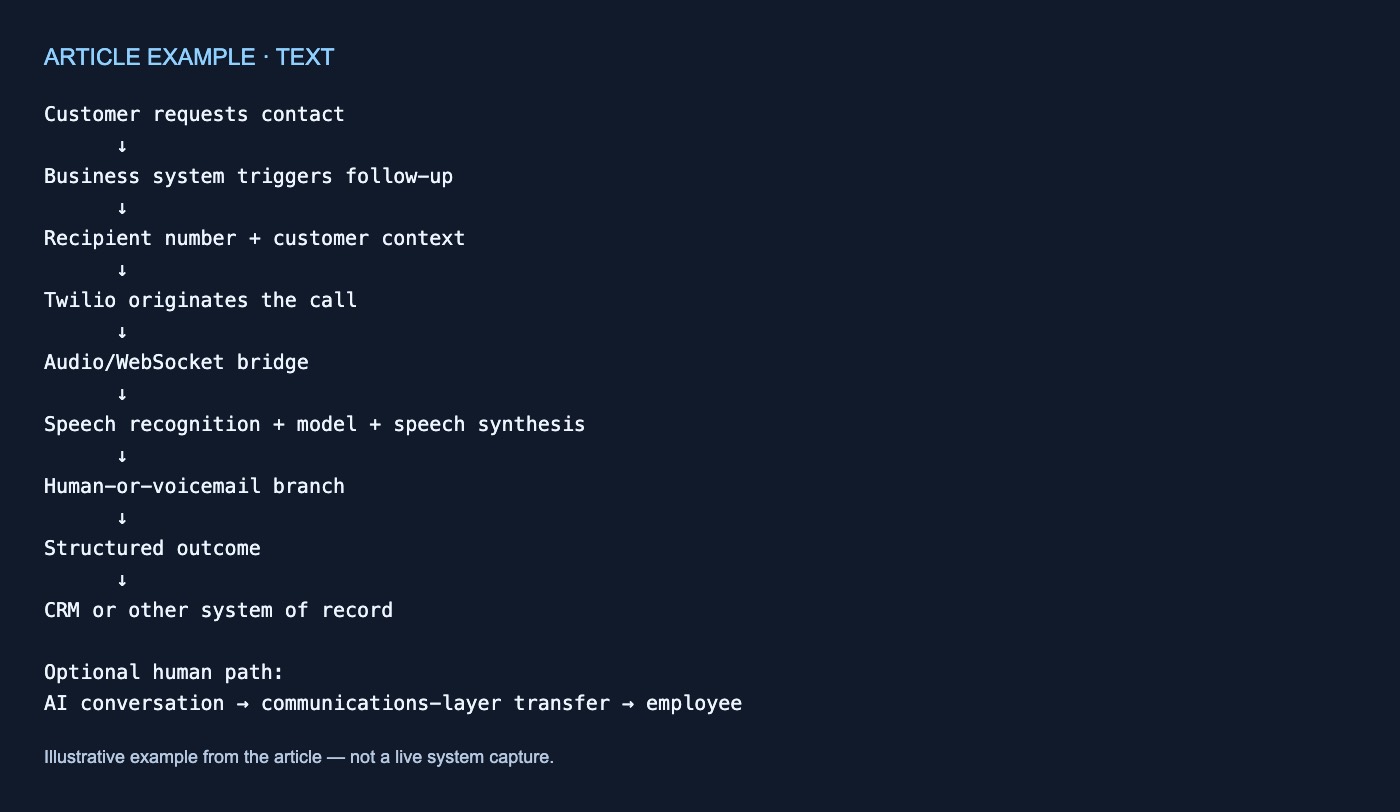
Customer requests contact
      ↓
Business system triggers follow-up
      ↓
Recipient number + customer context
      ↓
Twilio originates the call
      ↓
Audio/WebSocket bridge
      ↓
Speech recognition + model + speech synthesis
      ↓
Human-or-voicemail branch
      ↓
Structured outcome
      ↓
CRM or other system of record

Optional human path:
AI conversation → communications-layer transfer → employee
Each box needs an owner. A fluent voice demonstration may cover the middle of the diagram while leaving the surrounding business workflow unresolved.
1. A business event must trigger the call
An inbound receptionist waits for someone to call. An outbound agent requires an explicit trigger.
In the published outbound example, an external system—such as a CRM, webhook, or command-line script—sends the recipient’s number and lead context to a POST /make-call endpoint. The example does not establish compatibility with any particular small-business CRM. (Twilio outbound example)
For an appointment workflow, decide:
- Which event should initiate the call?
- Can the existing software supply the required information?
- Should an employee approve the call first?
- What happens if the trigger is duplicated or incomplete?
Keeping follow-up human-operated—or using automation only to create a callback task—remains a valid alternative.
2. The application must originate and transport the call
In the reference flow, the application calls Twilio’s REST API with TwiML containing <Connect><Stream>. Twilio dials the recipient, and a WebSocket-based session bridge then carries audio between Twilio and the AI runtime. (Twilio outbound example)
This separates two responsibilities:
- Telephony and transport: place the call and carry its audio.
- AI runtime: perform speech recognition, model reasoning, and speech synthesis.
A conversational model does not automatically provide call origination, session management, or recovery when another component fails. Those responsibilities must be assigned elsewhere in the architecture.
3. The agent needs context before speaking
An inbound caller can explain why they called. An outbound agent should already know why it is calling.
The outbound example dynamically builds the agent’s system prompt from lead data supplied with the call request. (Twilio outbound example) For a narrow appointment workflow, context could include the customer’s name, requested service, request identifier, scheduling preference, and the particular information needed.
The operator must determine which fields are necessary, accurate, authorized, and appropriate to provide to the voice runtime. The reference implementation does not resolve data-security, governance, or permission questions.
For broader workflow context, see RodyTech’s customer-service AI overview.
4. Voicemail is a separate outbound branch
An outbound call may reach a person, voicemail, or an ambiguous greeting. In the documented implementation, the server buffers incoming audio while Twilio’s asynchronous answering-machine detection runs. A detected person is connected to the AI runtime; detected voicemail receives a personalized synthesized message before the call ends. (Twilio outbound example)
That creates additional decisions:
- What information may be left in a voicemail?
- What happens when classification is uncertain or incorrect?
- Should the system try again or create a staff task?
- How should each outcome be recorded?
The documentation gives an approximate detection interval, but this article did not test it. It provides no detection-accuracy or false-classification rate, so timing and accuracy should not be treated as guaranteed.
5. The outcome must return to the business workflow
A transcript alone may not tell staff what to do next. The outbound reference produces structured outcome JSON and describes returning the result to a CRM. (Twilio outbound example)
A limited appointment workflow might define outcomes such as:
appointment_booked
customer_requested_staff
voicemail_left
no_answer
wrong_number
missing_information
call_failed
These are illustrative labels, not a documented CRM schema. Field mapping, duplicate handling, transcript retention, failed writes, notifications, and recovery procedures remain implementation decisions.
Human handoff belongs outside the model
A model may determine that an employee is needed, but generating that decision does not transfer the call.
Twilio documents a separate pattern in which communications middleware uses the <Enqueue> TwiML verb to route a voice call to Twilio Flex. Optional <Task> metadata can provide the employee with relevant context. (Twilio handoff pattern)
Twilio also describes Agent Connect as an orchestration layer for sessions, streaming, and handoff—not as a replacement for the model, contact-center platform, or business logic. (Twilio Agent Connect)
An operator therefore needs to define the transfer conditions, the component executing the transfer, the employee or queue receiving it, the context passed along, and the fallback when nobody is available. The outbound reference does not show that human handoff is automatically included.
What to settle before choosing a system
Assign responsibility for:
- Triggering and authorizing calls
- Validating customer context
- Originating and tracking calls
- Handling voicemail and uncertain detection
- Constraining the conversation
- Recording structured outcomes
- Recovering from failed calls or writes
- Escalating to available staff
- Governing data access and retention
These examples do not establish consent, regulatory compliance, deliverability, accuracy, latency, cost savings, CRM compatibility, or production readiness. Those questions require separate review.
The central distinction is simple: an outbound agent is a business workflow wrapped around a shared voice loop. If a proposal demonstrates only a natural conversation, much of the follow-up system may remain unspecified.
If useful, talk through your workflow.
Sources and further reading
- https://www.twilio.com/en-us/blog/developers/tutorials/product/ai-agent-conversationrelay-voice-mistral
- https://www.twilio.com/en-us/blog/partners/integrations/building-an-outbound-voice-agent-with-twilio-and-deepgram
- https://www.twilio.com/en-us/blog/developers/tutorials/product/integrate-ai-assistants-communications-channels
- https://www.twilio.com/en-us/blog/products/launches/agent-connect

No comments yet