

In this article
A personal “agent operating system” needs more than a language model. It needs somewhere to keep state, a control plane for tools and sessions, interfaces for people and devices, and clear boundaries around trust. OpenClaw’s public design offers one documented way to assemble those pieces: state, memory, and credentials live on the operator’s hardware, while a long-lived Gateway coordinates sessions, tools, events, and channel connections (OpenClaw README).
That makes OpenClaw a useful reference for thinking about a SkippyOS-style system, but not evidence about SkippyOS itself. This analysis is limited to OpenClaw’s public repository, documentation, and release notes. It does not establish any relationship between the projects or describe private SkippyOS features. No installation, protocol trace, compatibility test, or other hands-on testing was performed.
What “your own agent system” means
OpenClaw describes itself as an open-source assistant that runs on the operator’s computer. It can interact through supported chat services—including Discord, Slack, Telegram, and WhatsApp—and native applications for macOS, iOS, Android, Windows, and Linux (OpenClaw README).
The same Gateway software can be configured as a personal assistant on a laptop or as a shared team deployment. The distinction is configuration rather than a separate product edition (Why OpenClaw).
This model separates the assistant system from any single model. Conversations, tools, interfaces, automations, provider connections, and device capabilities meet at a coordinating service. OpenClaw presents Claude, Codex, and local models as replaceable plugins rather than inseparable parts of its state layer (OpenClaw README). That is a documented architectural goal, not proof that every provider or harness works interchangeably in every configuration.
The Gateway is the control plane
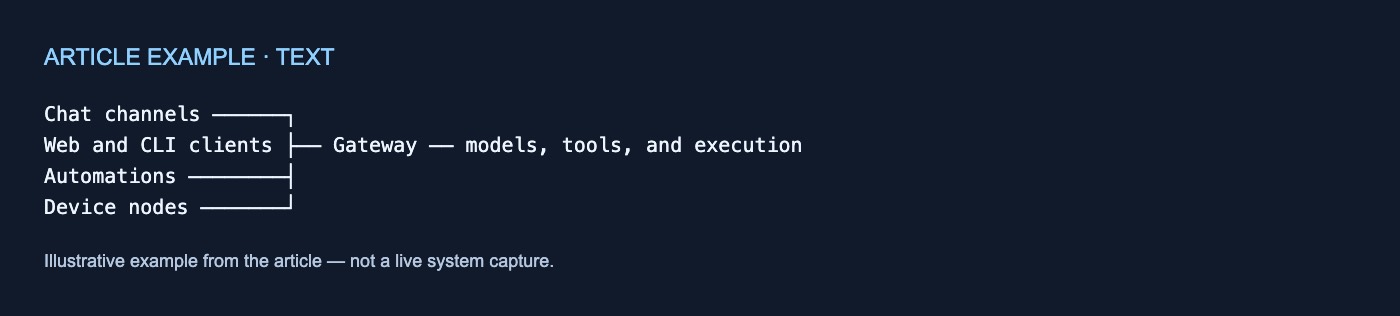
OpenClaw calls the Gateway its local control plane for sessions, tools, events, and channel connections. The Control UI, CLI, and TUI connect to it; the architecture documentation also identifies applications and automations as control-plane clients (OpenClaw README; Architecture documentation).
The published topology assigns messaging surfaces to one long-lived Gateway and specifies one Gateway per host. The Gateway maintains provider connections and exposes a typed WebSocket API for requests, responses, and server-pushed events. Those events include agent activity, chat, presence, health, heartbeat, and cron activity (Architecture documentation).
Chat channels ──────┐
Web and CLI clients ├── Gateway ── models, tools, and execution
Automations ────────┤
Device nodes ───────┘
Control clients and device nodes use WebSocket connections, but nodes declare a distinct role and explicit capabilities or commands. Documented examples include camera, screen-recording, and location functions. Connections require a handshake, and the Gateway validates inbound frames against JSON Schema (Architecture documentation).
The protocol also has an operational limitation: events are not replayed. Clients must refresh when they detect gaps rather than assume reconnecting will recover every missed event (Architecture documentation). This is an important distinction between a control stream and a durable event log.
Local state does not mean local-only data
The project states specifically that state, memory, and credentials live on the operator’s hardware (OpenClaw README). For a homelab operator, those categories form the documented local ownership boundary.
They do not encompass every possible copy of information. Prompts go to the model providers and chat platforms the operator configures, and diagnostics can be exported if enabled (OpenClaw README). Tools may also gain access to host files or credentials according to their configuration.
A useful review therefore distinguishes among locally held state, memory, and credentials; messages processed by external chat platforms; prompts sent to model providers; files available to tools; and transcripts or derived records outside tracked memory. The public documentation does not provide a complete file-by-file storage map, so the local-state claim should not be expanded into a promise that all data remains on the host.
Memory deletion has boundaries
OpenClaw documents provenance and deletion controls for attributable memories. Such memories can be purged, while forgotten-session records can prevent participating ingestion paths from reintroducing them. Original transcripts, untracked writes, and external copies remain separate (Why OpenClaw).
Promoted memories have no documented time-based retention limit. The documented forgetting mechanism covers tracked artifacts, but not direct writes, hooks, or raw transcript indexing (Why OpenClaw).
“Forget this” should therefore not be interpreted as “erase every related record.” A homelab retention plan must separately address tracked memories, original transcripts, indexes, tool-created files, backups, and copies held by external services.
Pairing has a loopback exception
All WebSocket clients provide a device identity when connecting. New identities do not, however, follow one universal approval rule. Eligible direct local-loopback connections can be auto-approved for smoother same-host use. LAN, tailnet, and other non-local connections—including same-host tailnet binds—still require explicit pairing approval. Gateway authentication applies to both local and remote connections (Architecture documentation).
A private network is consequently not an automatic trust boundary. For remote access, the documentation prefers Tailscale or another VPN and presents an SSH tunnel as an alternative (Architecture documentation).
Default operation assumes one trusted operator
OpenClaw describes its default configuration as a trusted single-operator assistant. Sandboxing and execution approvals are off by default, so stronger isolation requires deliberate configuration (Why OpenClaw).
One Gateway is also one trust domain. Roles and session ownership provide collaboration guardrails, but mutually untrusted tenants should use separate Gateways, preferably under separate operating-system users or on separate hosts (Why OpenClaw). Configuration alone should not be treated as strong tenant isolation.
A homelab decision checklist
Before adopting this design, decide:
- Host ownership: Which machine will retain state, memory, and credentials?
- External flows: Which prompts and messages may reach model providers or chat platforms?
- Trust boundary: Are all users mutually trusted, or do some require separate Gateways and OS identities?
- Execution policy: Which tools may run on the host, and which need sandboxing or approval?
- Device admission: Which loopback connections may be auto-approved, and who approves non-local devices?
- Memory lifecycle: How will tracked memories, transcripts, indexes, files, and backups be retained or deleted?
- Credential scope: Which tools and plugins can access each secret?
- Version checks: Does the installed release actually provide the documented behavior?
Current setup documentation lists Node.js 24.16+ or 26.1+ and model access through an existing Claude Code or Codex login or a provider API key (Getting started). These requirements can change. The security comparison itself was reviewed against development snapshots and warns operators to verify their installed version and configuration before relying on a capability (Why OpenClaw).
OpenClaw’s public contribution is a clear architectural boundary: operator-controlled hardware holds specified core data, and the Gateway coordinates the agent system around it. For a SkippyOS-style project, that is a practical reference model—not proof of unpublished features, measured reliability, or operational performance.
No comments yet