

In this article
Home Assistant uses similar template syntax in entities, triggers, blueprints, conditions, and actions. But syntax alone does not determine what a template can do. The containing field determines when it is evaluated, what information is available, and what can cause another evaluation.
That explains the apparent contradiction: a state-based template entity can follow a sensor automatically, while a template in trigger_variables or an MQTT trigger’s topic cannot call states().
The key is evaluation context.
Template contexts at a glance
| Context | When it is used | State and time access | Variables and reevaluation |
|---|---|---|---|
| State-based template entity | Producing an entity’s state | Entity state is available | Provides this; without explicit update triggers, updates are based on referenced entities (Template integration) |
| Trigger-based template entity | After a declared trigger reacts | Entity state is available to entity templates | Provides trigger and this; references inside the template do not schedule updates (Template integration) |
| Automation template trigger | Watching an expression | Entity state and time functions are available | Reevaluates for recognized entity references; time use such as now() causes evaluation at the start of each minute (Template integration) |
| Limited setup template | Configuring a trigger or another documented limited-template field | Entity state and current time are unavailable | Available variables depend on the field; most results are retained until triggers are configured again (Limited templates) |
| Runtime condition or action template | After a trigger starts an automation | Trigger data and normal template features are available | Can inspect trigger; properties depend on the trigger type (Automation trigger data) |
These contexts are not interchangeable. Some templates help define what Home Assistant should listen for. Others render only after something has happened.
State-based template entities follow references
A state-based template entity has no explicit update triggers. Home Assistant updates it based on entities referenced by its templates (Template integration).
For example:
{{ states('sensor.desk_height') }}
Here, sensor.desk_height is both readable and an update dependency. When that entity changes, Home Assistant can render the template entity again.
Automation template triggers use related dependency tracking. Home Assistant evaluates a template trigger when recognized referenced entities change:
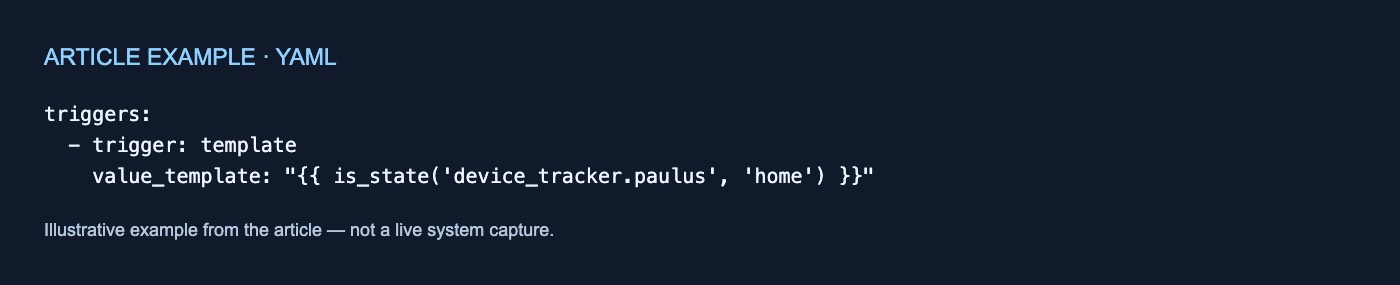
triggers:
  - trigger: template
    value_template: "{{ is_state('device_tracker.paulus', 'home') }}"
The trigger reacts when its rendered result changes from false to true. It does not keep firing while the result remains true (Automation triggers).
A template trigger using time—for example, now()—is also evaluated at the start of every minute. If it references neither an entity nor time, it is not evaluated again (Template integration).
Trigger-based template entities separate reading from scheduling
A trigger-based template entity updates in response to its declared triggers. An entity referenced inside its state template does not automatically become an update source.
Home Assistant documents that these entities do not update merely because a referenced state changes. To restore that behavior, declare a state-change trigger for each entity that should initiate an update (Template integration).
template:
  - triggers:
      - trigger: state
        entity_id: sensor.desk_height
    number:
      - name: Desk Height
        state: "{{ states('sensor.desk_height') }}"
The state template can read sensor.desk_height, but the declared trigger determines when an update occurs. Reading a value and scheduling an update are separate operations.
Limited templates configure triggers before anything happens
Some fields provide values Home Assistant needs while setting up an automation. These fields use limited templates. Documented examples include:
- Automation-level
trigger_variables - MQTT trigger
topic - Event trigger
event_type,event_data, andcontext - Time trigger
at - Webhook trigger
webhook_id - The
enabledoption of triggers
Limited templates cannot read entity state or the current time. Functions including states, is_state, state_attr, now, and utcnow are unavailable. They can still use features such as math, text and list filters, control structures, and values known in advance, including blueprint inputs (Limited templates).
Home Assistant evaluates most limited templates when the automation is set up and retains the result until its triggers are configured again—for example, after a reload or after turning the automation off and on. The documentation says most, because it describes separate evaluation behavior for contexts including trigger_variables and wait-for-trigger steps (Limited templates).
A setup template cannot read current state because it would capture only the state present during configuration rather than follow subsequent changes. When automation behavior must depend on current home state, the documentation recommends using a condition instead.
trigger_variables and trigger belong to different stages
The similar names hide an important distinction.
trigger_variables supplies values while Home Assistant attaches triggers. Its values use limited templates and are intended particularly to make blueprint inputs available in templated trigger fields. Trigger attachment is not reapplied merely because a resulting value changes (Automation triggers).
The singular trigger variable contains data about the event that started an automation. It is unavailable in trigger options and trigger_variables because nothing has triggered during setup (Limited templates).
Home Assistant recalculates trigger_variables for conditions and actions each time an automation runs. An expression using random, for example, can then differ from the setup value used by the triggers. It remains a limited template, however, so this recalculation does not grant access to entity-state or current-time functions (Limited templates).
Runtime templates can inspect the actual trigger
After a real trigger starts an automation, templates in its conditions and actions can inspect trigger. Available properties depend on the trigger type (Automation trigger data).
A state trigger can provide old and new state data:
Paulus changed from {{ trigger.from_state.state }}
to {{ trigger.to_state.state }}
An MQTT trigger provides properties including trigger.topic, trigger.payload, and—when the payload is valid JSON—trigger.payload_json.
This is runtime data, not setup data: trigger describes what initiated the automation run.
There is no real trigger data when using Run actions or the Trigger automation action. In those cases, trigger.platform is None, and templates using other trigger properties fail (Automation trigger data).
Choose by when the value must be known
Use:
- A state-based template entity when a derived value should follow referenced entities.
- A trigger-based template entity when declared events or schedules should control updates.
- A template trigger when an automation should start as an expression changes from false to true.
- A limited template for permitted values needed while configuring a trigger.
- A runtime condition or action template when logic depends on the event that started the automation.
- A condition when behavior must depend on current home state rather than a limited setup field.
The capabilities differ because the templates operate in different contexts: dependency-driven rendering, trigger configuration, or runtime after an event. This distinction is based on the cited documentation; it does not establish undocumented ordering, latency, performance, persistence, or error-recovery behavior.

No comments yet