

In this article
When commissioning an AI assistant for manuals, supplier documents, or internal procedures, a small-business app owner must decide how employees will inspect its answers. Should a citation lead to a familiar PDF page, an exact range in plain text, or an application-defined section?
Claude uses different citation locations depending on how a document is supplied: PDF page ranges, plain-text character ranges, or custom-content block ranges (Claude citations documentation). This makes document representation an interface decision as well as a technical one. The goal is to help a person find and review a supporting passage—not to imply that a citation proves the answer is correct.
What a returned citation identifies
A Claude response may contain multiple text blocks, and each block may carry a list of citations supporting a claim in that block (Claude citations documentation). Each citation identifies:
- The source document:
document_index - A location within it: a page, character, or content-block range
- The cited text:
cited_text
document_index is the document’s zero-based position among all document content blocks in the request, including documents supplied across multiple messages (Claude citations documentation). It is not a page number, permanent file identifier, or quality score.
For example, suppose a request contains these documents in order:
- Document 0: Equipment manual
- Document 1: Supplier warranty
- Document 2: Maintenance procedure
A citation with "document_index": 1 refers to the supplier warranty. The citation’s remaining fields locate the passage within that document. An application should therefore preserve request-document order and map each index to a recognizable title.
Choose a representation for the inspection task
The practical decision is which reference system employees can use when checking an answer.
| Document representation | Returned location | Range rules | Useful inspection context |
|---|---|---|---|
| Text-bearing PDF | Page range | Pages start at 1; end is exclusive | Staff review paginated manuals |
| Plain text | Character range | Starts at 0; end is exclusive | The app can select a text substring |
| Custom content | Content-block range | Starts at 0; end is exclusive | The app defines clauses, steps, or sections |
PDF and plain-text content are automatically chunked into sentences for citations. Custom-content blocks remain as supplied, without further chunking (Claude citations documentation). These are citation mechanics, not evidence that one representation produces more accurate answers.
For related interface planning, see RodyTech’s AI app overview.
Reading PDF page locations
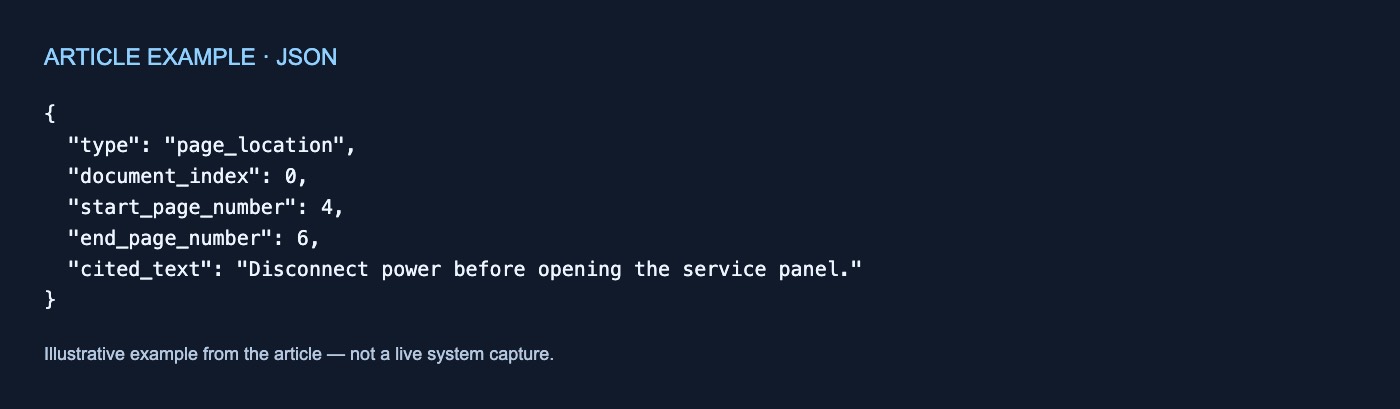
A PDF citation uses page_location. Page numbers are one-based, while the end page number is exclusive (Claude citations documentation).
Hypothetical, untested example:
{
  "type": "page_location",
  "document_index": 0,
  "start_page_number": 4,
  "end_page_number": 6,
  "cited_text": "Disconnect power before opening the service panel."
}
This range covers pages 4 and 5—not page 6. It provides a page range rather than coordinates or a highlight within either page. A reader-facing display could translate the raw values into:
Equipment Manual, pages 4–5: “Disconnect power before opening the service panel.”
Reading plain-text character locations
A plain-text citation uses char_location. Character indexes are zero-based, and the end index is exclusive (Claude citations documentation).
Hypothetical, untested example:
{
  "type": "char_location",
  "document_index": 1,
  "start_char_index": 120,
  "end_char_index": 168,
  "cited_text": "Warranty claims must be filed within 30 days."
}
The location corresponds to a range such as text[120:168]. It refers to the plain text supplied to Claude, not to pages in an earlier PDF or word-processing file.
Character offsets can let an application select the corresponding substring. Because raw offsets are difficult to review manually, a useful display can also show the source title and returned cited text.
Reading custom-content block locations
A custom-content citation uses content_block_location. It points to the original content-block list supplied by the application. Its indexes are zero-based, and the end is exclusive (Claude citations documentation).
Suppose a procedure contains:
- Block 0: Purpose
- Block 1: Safety checks
- Block 2: Filter replacement
- Block 3: Restart procedure
A hypothetical range starting at 1 and ending at 3 covers blocks 1 and 2. Because custom-content blocks are not divided further for citations, their size determines the available granularity. This representation may suit an application that already divides documents into meaningful clauses, procedure steps, or transcript turns.
How file_id differs from document_index
The Files API lets an application upload a PDF or text file, then reference it in a document content block through file_id (Claude Files API documentation). The three identifiers serve different purposes:
file_idreferences the uploaded file.document_indexidentifies the document’s position in the request.- The page, character, or block range identifies the cited location within it.
Citations are enabled on each document with "citations": {"enabled": true}. Current documentation says citations must be enabled for every document in a request or for none of them (Claude citations documentation).
For broader planning context, see RodyTech’s services overview.
PDF vision is not image citation
Claude’s PDF processing converts each page into an image and supplies extracted page text alongside it, allowing analysis of textual and visual content (Claude PDF support documentation). Citation support is narrower: only text citations are currently supported, not citations to PDF image content (Claude citations documentation).
A PDF citation should therefore not be presented as direct citation of a chart, diagram, or other image. An image-only scanned PDF without extractable text is not citable through this mechanism (Claude citations documentation). That limitation concerns citation availability, not whether Claude can inspect visual content.
Hypothetical citation-inspection worksheet
A commissioning worksheet can make the mapping explicit:
| Field | Hypothetical value |
|---|---|
| Answer claim | Replace the filter every 90 days |
document_index |
2 |
| Mapped request document | Maintenance Procedure |
file_id |
Recorded if the Files API was used |
| Citation type | content_block_location |
| Raw range | Start 4, end 5 |
| Human-readable location | Block 4 only |
| Returned cited text | “Replace the intake filter every 90 days.” |
| Reviewer note | Passage addresses standard use |
Ask the developer to expose the source title, cited text, and translated location while retaining the raw fields for inspection. Confirm that exclusive end values are interpreted correctly and that visual observations are not displayed as text citations.
Citation locations make an answer traceable to supplied text. They do not establish that the answer is correct, complete, or interpreted appropriately. This article explains vendor-documented mechanics only; no implementation, hands-on test, extraction measurement, user study, customer outcome, or answer-correctness evaluation was performed. All examples are hypothetical and untested.
If useful, talk through your workflow.



No comments yet