

In this article
Adding --cloud does not relocate a local Docker sandbox with all its dependencies intact. It selects a separate backend with its own sandboxes, templates, secrets, volumes, and network policies. A sandbox shown by sbx ls does not appear in sbx --cloud ls, and resources created for one backend do not automatically become available to the other (Docker: Local versus cloud sandboxes).
That distinction matters when an AI agent depends on anything outside its sandbox filesystem: a model server on your workstation, mounted project files, host hardware, credentials, MCP servers, ports, or local network rules.
The governing distinction is straightforward:
--cloudselects the cloud backend.sbx movecopies a filesystem snapshot between backends.- Neither makes host-dependent resources available in the cloud.
This is a documentation-based explanation. No migration, model connection, or performance test was performed. The cited pages do not state an applicable product or CLI version.
Trace a local model across the boundary
Docker Agent documents this Ollama configuration:
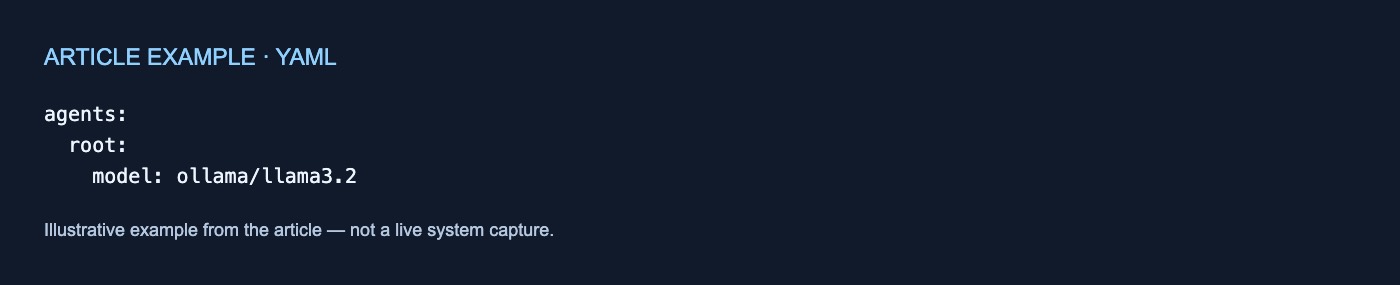
agents:
  root:
    model: ollama/llama3.2
The built-in ollama alias uses the OpenAI-compatible endpoint http://localhost:11434/v1. Docker also documents custom model definitions whose base_url points to another host or port (Docker: Local Models).
This setup has three distinct dependencies:
- Agent configuration naming the model.
- A running model server.
- A network route from the agent to that server.
A cloud sandbox has no path back to the machine where sbx runs. Docker also lists model selection through the local --model and --provider options among the host-dependent features that do not apply with --cloud (Docker: Local versus cloud sandboxes).
A model configuration file may remain in a copied filesystem, but a model server running on the workstation does not move with it. The cloud workflow would need a separately configured endpoint reachable from its environment. The documentation does not verify tunnels, public routes, model compatibility, or connectivity to any particular server.
A dependency worksheet
Inventory each dependency before treating the workflow as portable:
| Dependency | Where it lives | What crosses | Destination action | Verification |
|---|---|---|---|---|
| Sandbox files | Sandbox filesystem | Filesystem snapshot | Inspect copied files | Confirm required files exist |
| Workspace or bind mount | Host path | Nothing automatically | Transfer files or clone the repository | Open required project files |
| Local model server | Workstation and local network | Configuration file may cross; server does not | Configure a reachable endpoint | Check the intended endpoint |
| GPU, USB, display, nested virtualization | Host hardware | Nothing | Replace the dependency or keep it local | Confirm the workflow no longer expects it |
| Published port | Local host binding | Eligible TCP ports may be transformed | Use the cloud URL | Update and check clients |
| Managed secret | Local secret store | Nothing | Add it to the cloud store | Confirm the destination secret exists |
| Credential in a file | Sandbox filesystem | May be copied | Remove or retain deliberately | Inspect copied files |
| MCP registration | Local MCP store | Nothing automatically | Connect through Docker Agentic Platform | Confirm the required server is available |
| Host mount, clone-mode volume, or cloud volume | Attached storage | Not copied by sbx move |
Transfer required files separately | Check destination data |
| Network policy | Local policy store | Not copied | Configure cloud rules | Verify allowed and blocked connections |
| Process or memory state | Running sandbox | Nothing | Restart the workload | Confirm required processes start |
A copied filesystem is therefore not a complete environment migration.
Workspace, configuration, and storage
A local sandbox can mount host paths or use a private Git clone backed by the host repository. A cloud sandbox cannot access those paths; Docker says to transfer files or clone a repository inside the cloud sandbox (Docker: Local versus cloud sandboxes).
Cloud environment files support a subset of local fields, including agents, environment variables, resource limits, and credentials. Host workspace and port mappings must be removed before using a local environment file in cloud mode. The CLI rejects local-only flags used with --cloud rather than silently ignoring them (Docker: Local versus cloud sandboxes).
Storage belongs to separate systems. Local persistence uses the local sandbox and attached host resources; cloud persistence uses the cloud sandbox and optional cloud volumes. During a move, host mounts, clone-mode volumes, and cloud volumes are not copied. Docker directs users to transfer required files separately with sbx cp (Docker: Local versus cloud sandboxes).
That separate transfer is not documented as reproducing every permission, metadata field, application state, or storage behavior.
Hardware and ports
Local sandboxes may use supported host integrations such as GPU, USB, display access, and nested virtualization. Cloud sandboxes cannot access that host hardware (Docker: Local versus cloud sandboxes).
Ports remain available through a different mechanism. Local sandboxes bind ports to host addresses and ports, while cloud sandboxes expose sandbox ports through public HTTPS URLs. During a local-to-cloud move, eligible TCP ports receive cloud URLs and refused ports are skipped with a warning. On a cloud-to-local move, cloud URLs are not retained; ports use local loopback bindings instead (Docker: Local versus cloud sandboxes).
Clients may consequently need new endpoint values. The documentation does not establish authentication, URL lifetime, or reachability for those cloud URLs.
Secrets and MCP servers
Managed secrets do not move between stores. Local sandboxes read from the local sbx secret store, while cloud sandboxes read from the separate sbx --cloud store. Required destination credentials must be configured there (Docker: Local versus cloud sandboxes).
Credentials inside ordinary files have a different boundary: those files may be included in the snapshot. Docker advises removing them before moving if their credentials should not be copied.
MCP configuration is also backend-specific. Local sandboxes use servers registered in the local MCP store; cloud sandboxes use MCP servers connected through Docker Agentic Platform. Backend resources do not automatically become available to the other backend (Docker: Local versus cloud sandboxes).
Network policy is separate
Local policy controls network access for local sandboxes, globally or by sandbox. When organization governance is active, local allow rules cannot loosen organization restrictions, while local deny rules remain active (Docker: Local policy).
Cloud sandboxes use separate account and sandbox network policies. sbx move does not copy local policy, so destination rules must be configured and verified separately. Cloud sandboxes also do not support HTTP method and path restrictions, or L7 filtering; the cloud CLI rejects local governance profiles and the --protocol option (Docker: Local versus cloud sandboxes).
What sbx move actually copies
sbx move creates a separate destination sandbox from a filesystem snapshot. It leaves the source sandbox in place and does not transfer running processes or memory. Moving also does not unify the local and cloud resource stores (Docker: Local versus cloud sandboxes).
The practical boundary is narrow: sbx move can copy the sandbox filesystem, but it does not recreate the local machine around it. Before continuing work, verify the destination model endpoint, files, secrets, MCP connections, ports, architecture, storage, network rules, and restarted processes.
No comments yet