

In this article
A Home Assistant timer’s idle state describes where the timer is now, not necessarily how it arrived there. The same state can mean that the timer has never started, completed its countdown, was finished early, or was cancelled.
Home Assistant provides dedicated timer.finished and timer.cancelled triggers for automations that must distinguish those outcomes. The distinction matters because cancellation does not fire the finished trigger, while an explicit Finish timer action does.
There is also a startup boundary to account for: if a timer finishes while Home Assistant is not running, its finished automation does not run after startup. Restoring timer state therefore must not be treated as replaying a missed completion trigger.
The timer state model
A Home Assistant timer has three documented states: idle, active, and paused. A timer is idle when it has not yet been started, has finished, or has been cancelled, according to the Timer integration documentation.
That produces this documentation-derived outcome map:
| What happened | Resulting state | Outcome trigger |
|---|---|---|
| Timer has never been started | idle |
Neither trigger |
| Countdown reaches zero | idle |
timer.finished |
| Timer is ended early with Finish timer | idle |
timer.finished |
| Timer is cancelled before zero | idle |
timer.cancelled |
The first row is an inference from the triggers’ documented conditions: a never-started timer has neither finished nor been cancelled. The remaining rows combine the integration’s state description with the dedicated trigger references.
Checking for idle is appropriate when an automation only needs the timer’s current state. It is not enough when the automation must identify the preceding outcome. In that case, choose the trigger corresponding to the event that matters.
Reacting to a completed timer
The timer.finished reference documents two ways this trigger can fire:
- The countdown reaches zero.
- The timer is ended early with the Finish timer action.
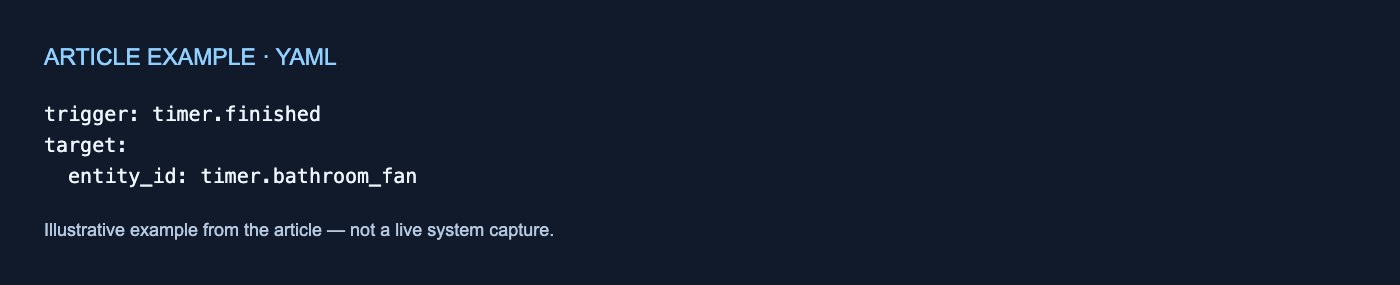
For one timer entity, the documented YAML trigger is:
trigger: timer.finished
target:
  entity_id: timer.bathroom_fan
This form watches timer.bathroom_fan and fires when that timer finishes. It can be used as the trigger for an action such as turning off the bathroom fan at the end of its timed run.
The important nuance is that “finished” does not mean only that the configured duration elapsed naturally. Home Assistant also produces timer.finished when Finish timer ends an active or paused timer early. The trigger type by itself therefore does not distinguish reaching zero from an explicit Finish action; both are documented completion paths.
That behavior makes timer.finished suitable when an automation should perform the same action in either case. It is not suitable if the desired distinction is specifically between natural expiry and an early Finish action, because the supplied documentation maps both to the same trigger and does not establish a separate trigger for those two cases.
Reacting to cancellation
The timer.cancelled reference says this trigger fires when a timer is cancelled before reaching zero.
Its documented single-entity YAML form is:
trigger: timer.cancelled
target:
  entity_id: timer.laundry
This trigger watches timer.laundry and fires when that timer is cancelled. It lets an automation handle an abandoned countdown separately—for example, by sending the cancellation-specific notification shown in the official reference.
Cancellation has two other documented effects. It resets the timer to its configured starting duration, and it does not fire timer.finished. Those behaviors make cancellation different from using Finish timer, even though both operations can end a running or paused countdown. The cancelled-trigger documentation states the reset and explicitly says that a cancelled timer does not fire Timer finished.
The practical comparison is:
| Required automation behavior | Trigger to use | Important boundary |
|---|---|---|
| React when time reaches zero | timer.finished |
Also fires for Finish timer |
| React when Finish timer is used | timer.finished |
Shares the trigger with reaching zero |
| React specifically to cancellation | timer.cancelled |
Does not also fire timer.finished |
| Check whether the timer is currently inactive | Check for idle |
Does not reveal the preceding outcome |
Separate finished and cancelled automations are useful when the two paths need different actions. If both should produce the same response, handling both triggers identically is an automation-design decision rather than information conveyed by idle.
What happens when Home Assistant is offline
The Timer integration documents a specific downtime limitation: when a timer finishes while Home Assistant is not running, an automation using the Timer finished trigger does not run after startup. The same limitation appears in the dedicated timer.finished reference and the broader Timer integration documentation.
Consider the resulting sequence:
- A timer is active.
- Home Assistant stops.
- The timer’s scheduled end passes during the downtime.
- Home Assistant starts again.
Home Assistant does not then run the missed timer.finished automation. Any restoration of timer state must not be interpreted as replay or delayed delivery of that completion trigger.
This is a narrow limitation, not a broader claim about timer persistence. The supplied documentation does not explain restoration mechanics, scheduler internals, timing guarantees, or general event-delivery guarantees. It establishes only that timer.finished is not run after startup for a finish that occurred while Home Assistant was offline.
Choosing the right signal
Use timer.finished for the documented completion outcome, remembering that completion includes both reaching zero and using Finish timer. Use timer.cancelled when cancellation needs its own response. Use the timer’s state when only its present condition—idle, active, or paused—matters.
This explanation is based solely on the current official documentation supplied for this article; no hands-on test was performed. The pages were retrieved on October 19, 2026, and do not identify a Home Assistant release version, so the discussion should not be read as a cross-version compatibility guarantee.


No comments yet