


In this article
A repeated request unexpectedly reports fewer cached tokens than you anticipated. Did a changed tool break the prefix, did the comparison fail, or were some tokens reused from another cache entry? OpenAI exposes separate fields for answering these questions.
Use this mental model:
- Baseline:
comparison_response_idselects an earlier response for comparison. - Explanation:
prompt_cache_diagnosticsdescribes the outcome of that comparison. - Measurement:
usage.input_tokens_details.cached_tokensreports cached-token reuse for the current response.
The baseline does not load an earlier conversation or force its cache entry to be used. Likewise, a diagnostic cache_hit does not mean every input token came from cache. These boundaries apply to the Responses API on supported GPT-5.6-and-later models—not necessarily every model in that family (Prompt cache diagnostics).
This is a documentation-based explanation; no live API test was performed.
Start with a suitable baseline
Set prompt_cache_options.comparison_response_id to the ID of a recent completed response from the same organization whose prefix you expected the current request to reuse. A preceding conversation turn is one possible baseline (Prompt cache diagnostics).
The diagnostic result is relative to that response. Reuse requires an exact prompt-prefix match and compatible request settings, including the model, service tier, and tools. The documentation does not present that list as exhaustive (Prompt cache diagnostics). When tools belong to the reusable prefix, their definitions and ordering must remain identical between requests (Prompt Caching 101).
A prefix must also meet the model’s minimum cacheable length. For GPT-5.6 and later, that minimum is 1,024 tokens; tokens in OpenAI-provided hidden system content do not count toward it (Prompt caching guide). A stable prefix below the applicable minimum is therefore not eligible for caching.
Choosing a suitable baseline enables comparison. It does not guarantee that a matching cache entry remains available or will be reused.
Annotated tools_changed example
OpenAI’s example sends two requests with the same model, instructions, and input, but changes a function tool’s name. The gpt-6-astra model name below is reproduced from that documentation example; it is not a model recommendation.
from pathlib import Path
from openai import OpenAI

client = OpenAI()
policy = Path("support-policy.txt").read_text()  # At least 1,024 tokens.

baseline = client.responses.create(
    model="gpt-6-astra",
    instructions=policy,
    input="Reply with exactly OK.",
    tools=[{"type": "function", "name": "get_time"}],
)

current = client.responses.create(
    model="gpt-6-astra",
    instructions=policy,
    input="Reply with exactly OK.",
    tools=[
        {"type": "function", "name": "get_date"}  # Changed tool name.
    ],
    prompt_cache_options={
        "comparison_response_id": baseline.id  # Diagnostic baseline only.
    },
)
Here, comparison_response_id means “compare this request with that completed response for diagnostic purposes.” It does not load the earlier conversation, retrieve its content, change caching behavior, or direct the service to use a particular cache entry. The current request may still reuse a matching entry created by another request (Prompt cache diagnostics).
The documented result is:
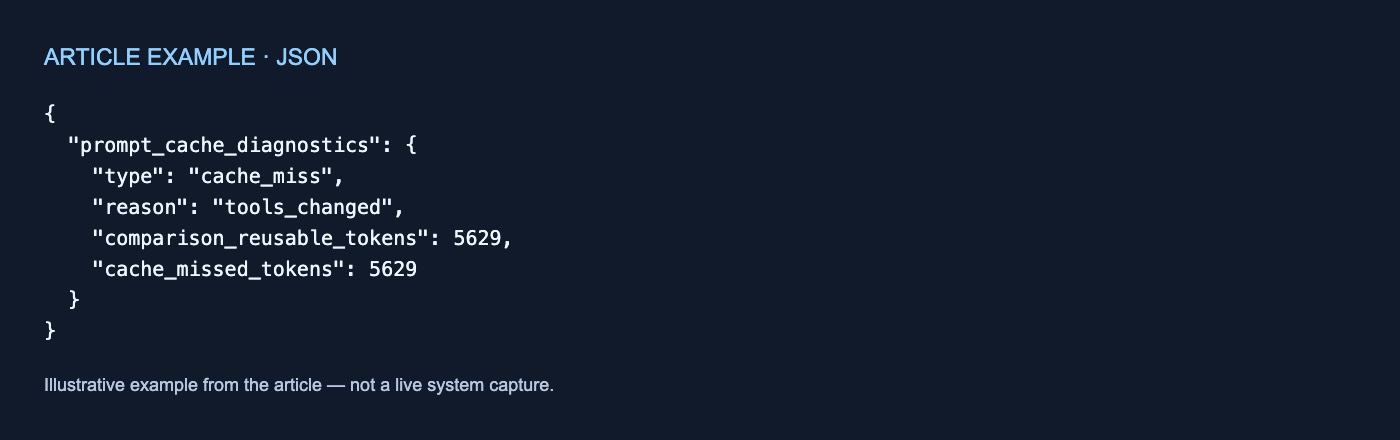
{
  "prompt_cache_diagnostics": {
    "type": "cache_miss",
    "reason": "tools_changed",
    "comparison_reusable_tokens": 5629,
    "cache_missed_tokens": 5629
  }
}
In this example, cache_miss says a difference prevented reuse of the expected prefix. tools_changed is the first reason classified. comparison_reusable_tokens gives the baseline’s reusable-prefix size, while cache_missed_tokens estimates how many of those tokens were not reused (Prompt cache diagnostics).
The 5,629-token figures are documentation examples, not independent measurements. This output omits cached_tokens, so it does not show the current response’s total reported reuse.
What each result or field establishes
The following meanings come from OpenAI’s diagnostics documentation (Prompt cache diagnostics):
| Result or field | What it establishes | What it does not establish |
|---|---|---|
comparison_response_id |
Selects the diagnostic baseline. | It does not load a conversation, select a cache entry, or force reuse. |
cache_hit |
No cache miss was detected for the selected comparison. | It does not prove every current input token was reused. |
cache_miss |
A difference prevented reuse of the expected prefix; the result includes a reason and cache_missed_tokens. |
It does not necessarily identify every difference. |
comparison_response_not_found |
No usable diagnostic record is available; it may be missing or expired. | It does not prove the response itself is unavailable through the API. |
unavailable |
The comparison was inconclusive, not ready, or unsupported by the model. | It establishes neither a hit nor a miss. |
comparison_reusable_tokens |
When present, the raw token count of the baseline’s reusable prefix. | It is not current-request cached usage. |
cache_missed_tokens |
An estimate of reusable baseline tokens that were not reused. | It is not an actual usage count. |
usage.input_tokens_details.cached_tokens |
The current response’s reported actual cache reuse. | It does not explain why expected tokens were missed. |
Diagnostic counts can differ from usage counts. Use diagnostics to understand the baseline comparison. Use the current response’s usage fields to measure reported token reuse; calculating charges separately requires the applicable model pricing.
Why cache_hit is narrower than it sounds
A diagnostic cache_hit concerns the compared prefix, not necessarily the entire current input. OpenAI illustrates this with a 2,500-token request that reports cache_hit after reusing a 2,000-token prefix and processing 500 new tokens (Prompt cache diagnostics).
Therefore:
prompt_cache_diagnostics.type == "cache_hit"
means no cache miss was detected for the selected comparison. It does not imply:
cached_tokens == input_tokens
To find the amount reported as reused, inspect:
cached = current.usage.input_tokens_details.cached_tokens
If you need only the amount reused, cached_tokens is the relevant field. Request diagnostics when you also need an explanation relative to a chosen baseline.
Locations, limits, and a practical checklist
For a non-streaming request, read prompt_cache_diagnostics from the completed current response. With stream=True, read it from event.response in the response.completed event (Prompt cache diagnostics).
Diagnostics are best effort. They may not classify every miss and report only the first classified reason, so one result does not rule out additional differences. comparison_reusable_tokens may be absent. An expired diagnostic record can produce comparison_response_not_found even while the response remains accessible through the API. unavailable is inconclusive, not evidence of either a hit or a miss (Prompt cache diagnostics).
For each investigation:
- Choose a recent completed baseline whose prefix should be reusable.
- Read
prompt_cache_diagnostics.typeas the comparison outcome. - For a miss, inspect its reason and diagnostic token estimates.
- Check
usage.input_tokens_details.cached_tokensfor reported reuse on the current response.
The durable distinction is simple:
prompt_cache_diagnosticsexplains a comparison with a selected baseline;cached_tokensreports reuse on the current response.



No comments yet