

In this article
When an Ollama model emits a tool call, the requested function has not yet run in the documented workflow. The call is structured model output containing a function name and proposed arguments. Application code reads that output, selects and executes a recognized function, appends the result to the conversation, and makes another chat request. (Ollama tool-calling documentation)
The boundary is straightforward:
- The application declares the available tools.
- The model requests a tool by name and supplies arguments.
- Application code resolves and executes the function.
- The application appends the result as a
role: "tool"message. - The updated conversation returns to the model for an answer or another call.
This is a documentation-based explanation; no hands-on test was performed.
The execution boundary at a glance
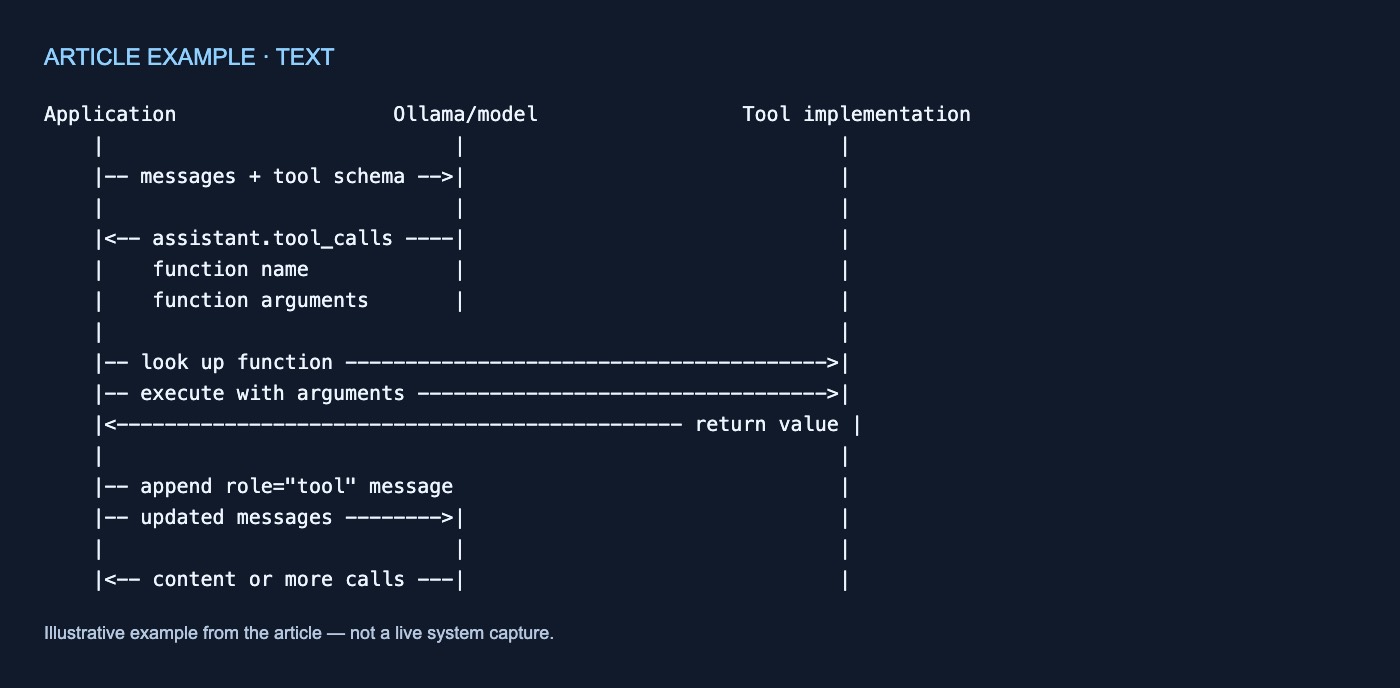
Application                  Ollama/model                 Tool implementation
    |                             |                               |
    |-- messages + tool schema -->|                               |
    |                             |                               |
    |<-- assistant.tool_calls ----|                               |
    |    function name            |                               |
    |    function arguments       |                               |
    |                                                             |
    |-- look up function ---------------------------------------->|
    |-- execute with arguments ---------------------------------->|
    |<----------------------------------------------- return value |
    |                                                             |
    |-- append role="tool" message                                |
    |-- updated messages -------->|                               |
    |                             |                               |
    |<-- content or more calls ---|                               |
1. The application declares a tool
Ollama’s single-tool example includes this function declaration in the chat request:
{
  "type": "function",
  "function": {
    "name": "get_temperature",
    "description": "Get the current temperature for a city",
    "parameters": {
      "type": "object",
      "required": ["city"],
      "properties": {
        "city": {
          "type": "string",
          "description": "The name of the city"
        }
      }
    }
  }
}
The declaration supplies a function name, description, required parameters, and property schema. It describes an option available to the model; the example later executes get_temperature explicitly in application code. The declaration alone does not demonstrate automatic argument validation. (Ollama tool-calling documentation)
2. The model requests a call
The documented response flow places tool_calls in an assistant message:
{
  "role": "assistant",
  "tool_calls": [
    {
      "type": "function",
      "function": {
        "name": "get_temperature",
        "arguments": {
          "city": "New York"
        }
      }
    }
  ]
}
The function name and arguments are model output. The city object is data in the assistant message, not evidence that the temperature function has run. The documentation also does not establish that every model will choose the intended tool or produce suitable arguments. (Ollama tool-calling documentation)
3. Application code executes the function
Ollama’s Python example extracts the first call and invokes a local function:
call = response.message.tool_calls[0]
result = get_temperature(**call.function.arguments)
The multi-turn example makes dispatch more explicit with an application-maintained map:
available_functions = {
    "add": add,
    "multiply": multiply,
}
The application checks whether the requested name exists, then calls the corresponding function with the supplied arguments. The example therefore places lookup and execution in application code rather than showing Ollama automatically invoking arbitrary application functions. (Ollama tool-calling documentation)
4. The result returns through a tool message
After execution, the application adds the return value to the conversation:
messages.append({
    "role": "tool",
    "tool_name": call.function.name,
    "content": str(result),
})
The message identifies the function through tool_name and puts its string-converted result in content. The application then submits the expanded history in another request:
final_response = chat(
    model="qwen3",
    messages=messages,
    tools=[get_temperature],
    think=True,
)
Preserving both the assistant’s tool-call message and the following tool result gives the next request the full exchange: what was requested and what came back. The example then reads final_response.message.content, although another workflow could continue if further calls appeared. (Ollama tool-calling documentation)
Multi-turn calls repeat the exchange
Ollama’s documented agent loop follows the same pattern:
- Send the current messages and tool declarations.
- Append the returned assistant message.
- Inspect its tool calls.
- Resolve recognized function names.
- Execute the corresponding functions.
- Append their results as tool-role messages.
- Send the expanded history again.
- Stop when the assistant returns no tool calls.
That stopping condition belongs to the example’s application-side orchestration. The page does not specify retries, approvals, or parallel execution behavior. (Ollama tool-calling documentation)
Web search follows the same boundary
Ollama’s search-agent example defines an application-owned map:
available_tools = {
    "web_search": web_search,
    "web_fetch": web_fetch,
}
The application resolves a requested name and executes the selected function:
function_to_call = available_tools.get(tool_call.function.name)

if function_to_call:
    args = tool_call.function.arguments
    result = function_to_call(**args)
The documented Web Search request targets the hosted https://ollama.com/api/web_search endpoint and sends an Ollama API key as a bearer token. It is distinct from the local /api/chat endpoint shown in the tool-calling example. The search-agent code serializes the returned value, truncates it for limited context lengths, and appends it as a tool message. (Ollama web-search documentation)
A documented Web Search response has a results array. Each result contains:
title, the page titleurl, the page addresscontent, a relevant content snippet
These objects are tool output rather than final answer text. In the agent example, they become model-visible only after application code inserts the serialized result into a tool-role message and continues the loop. The response shape does not establish search accuracy or source reliability. (Ollama web-search documentation)
Keep the fields distinct
| Data | Produced by | Location | Purpose |
|---|---|---|---|
message.thinking |
Model response | Assistant message | Thinking output when supported and enabled |
message.content |
Model response | Assistant message | Answer content |
tool_calls[].function.name |
Model response | Assistant message | Requested tool identifier |
tool_calls[].function.arguments |
Model response | Assistant message | Proposed tool inputs |
| Function return value | Executed tool | Application runtime | Output of application-side execution |
role: "tool" message |
Application | Conversation history | Carries a tool result into a later request |
Web-search results |
Web Search API | API response | Objects containing title, url, and content |
Ollama exposes message.thinking separately from message.content. Thinking support and controls are model-dependent; documented controls can include booleans, named levels, or a model default. (Ollama thinking documentation)
In the streaming example, application code separately accumulates partial thinking, content, and tool_calls fields before appending an assembled assistant message. (Ollama tool-calling documentation)
Implementation checklist
When reviewing an integration, confirm that it:
- sends tool declarations with the chat request;
- preserves the returned assistant message;
- resolves only names present in its application-owned function map;
- invokes the selected implementation in application code;
- appends each return value with
role: "tool"and the matchingtool_name; - resubmits the complete message history; and
- reads
thinking, answercontent, andtool_callsas separate fields.
The essential boundary is simple: the assistant proposes a call, the application dispatches it, the tool returns a value, and the application adds that value to the conversation. The documented examples do not turn a model-generated tool call into automatic application-function execution.



No comments yet