

In this article
OpenAI documents three ways for an application to obtain information from files:
- Put a file directly into a model request.
- Have application code search a vector store.
- Give a Responses API model access to the
file_searchtool.
The useful boundary is who controls retrieval. Direct input supplies a known file. The Retrieval API lets application code run the search and handle the results. The file-search tool lets the model search specified vector stores.
This comparison covers documented interfaces and request flows, not measured quality, latency, or cost.
Decision table
| Path | Best fit | Preparation | Search owner | Main controls |
|---|---|---|---|---|
| Direct file input | The application already knows which file belongs in the request | Provide Base64 data, an uploaded file ID, or an external URL | No separate vector-store search | Input form and PDF image detail |
| Retrieval API | Application code should run the search and handle returned content | Add files to a vector store | Application | Query and attribute filtering |
| File-search tool | The model should have access to search a prepared knowledge base | Add files to a vector store and enable file_search |
Model through the tool | Store IDs, result limit, filters, and result inclusion |
The Retrieval API and file-search tool both use vector stores. When a file is added to a vector store, it is automatically chunked, embedded, and indexed. Their main difference is which component initiates the search (Retrieval guide).
Path 1: Put a known file in the request
File URL, uploaded file ID, or Base64 data
                    |
                    v
          Responses API request
                    |
                    v
             Model response
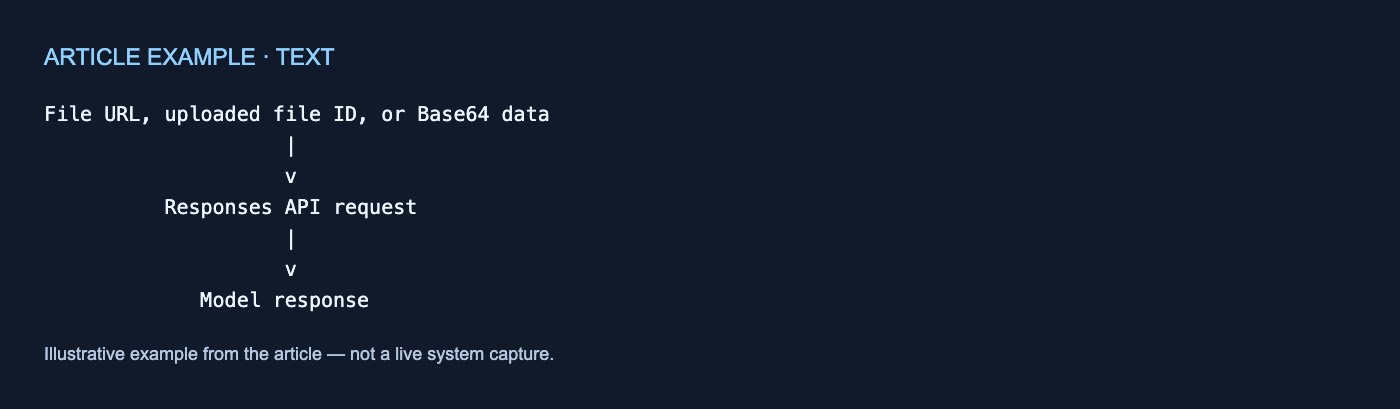
The Responses API accepts three documented input_file forms:
- Base64-encoded data through
file_data - A previously uploaded file through
file_id - An external file through
file_url
A simplified request can combine instructions with the file:
{
  "input": [{
    "role": "user",
    "content": [
      {
        "type": "input_text",
        "text": "Summarize the key changes in this document."
      },
      {
        "type": "input_file",
        "file_id": "file_example"
      }
    ]
  }]
}
This path puts the specified file into the request instead of searching a vector store for matching passages. It is the clearest option when the application already knows which document the model should process.
File support depends on the endpoint and the documented extension and MIME-type lists. The Responses API supports its listed file types as input_file items. Chat Completions accepts only PDF file content parts, does not accept external file URLs, and requires the application to extract and send text from non-PDF files (File inputs guide).
For PDFs, parsing includes extracted text and page images in context. This combined processing requires a vision-capable model and can increase token usage. The Responses API supports auto, low, and high detail settings for PDF page images (File inputs guide).
A direct-input request may contain multiple files, but each file must be under 50 MB and the files must total no more than 50 MB (File inputs guide). These are limits for this request path, not universal thresholds for vector stores. The same guide recommends File Search for retrieval over large files without defining a universal size at which applications must switch.
Path 2: Let application code search a vector store
Files
  |
  v
Automatic chunking, embedding, and indexing
  |
  v
Application searches the vector store
  |
  v
Application handles returned results
  |
  v
Optional separate model request
Vector stores are searchable containers used by the Retrieval API and file-search tool. Adding a file starts automatic chunking, embedding, and indexing. Some ingestion operations are asynchronous, so applications can poll for completion before searching (Retrieval guide).
In this path, application code explicitly issues the search:
query = "What is the return policy?"
results = vector_store.search(query)
The Retrieval API performs semantic search, which can surface related material even when few or no keywords match (Retrieval guide). This describes the search mechanism, not a ranking or relevance guarantee.
The application can then process the returned results. OpenAI’s example searches a vector store, formats the returned content as sources, and supplies those sources in a separate model request (Retrieval guide). Calling a model afterward is optional; the application could instead use the search results directly.
Vector-store files can carry attributes that semantic searches reference for filtering. The guide shows attributes such as region, category, and date and documents a maximum of 16 keys in the attributes dictionary (Retrieval guide).
Choose this path when application code should explicitly run the search and decide how to use its output.
Path 3: Give the model the file-search tool
Files
  |
  v
Vector store
  |
  v
Responses request supplies file_search
and vector_store_ids
  |
  v
Model receives access to search the stores
  |
  v
Response
File search is a Responses API tool for semantic and keyword search over previously uploaded files. Before using it, the application must prepare a vector store and add files to it (File-search guide).
The request exposes the tool and identifies the available stores:
{
  "input": "Which maintenance steps apply to this device?",
  "tools": [{
    "type": "file_search",
    "vector_store_ids": ["vs_example"]
  }]
}
Unlike the Retrieval API flow, application code does not make a separate vector-store search call here. It gives the model access to the tool. That access should not be read as a guarantee that every request will invoke the tool or retrieve a particular result.
Documented controls include:
vector_store_idsto identify searchable storesmax_num_resultsto limit retrieved resultsinclude: ["file_search_call.results"]to return search results with the responsefiltersto restrict retrieval using file metadata
The documented filtering example applies an in condition to a category attribute. It is an example, not an exhaustive list of filter operators (File-search guide).
The boundary to remember
Use direct file input when the relevant file is known and should accompany the request.
Use the Retrieval API when application code should search, inspect, or select returned content.
Use the file-search tool when a Responses API model should receive retrieval access to specified vector stores.
These interfaces do not establish which path is fastest, cheapest, or most accurate. The cited documentation also does not provide universal size thresholds, ranking guarantees, or general guarantees about persistence, deletion, security, or privacy.



No comments yet